
Anime Crusaders X Stat Potential, Worthiness and Transfer
Improve a unit’s Damage, SPA and Range potentials, preserve useful rolls, and move a strong set of potentials to another unit.
Build Worthiness through takedowns or Training before rerolling. Spend 1 Stat Cube to replace all three potentials, or use the Perfect Stat Cube button beside one attribute to leave the other two unchanged. Configure Filter before rolling; confirming an overwrite warning still replaces the protected result. Multi supports up to 20 units. Convert stores a unit’s three potentials in a Stat Token and resets its potentials to minimum values; apply the token through Wish Girl’s Transfer Potential window to transfer the stored values and consume the token.
Damage, SPA and Range potential
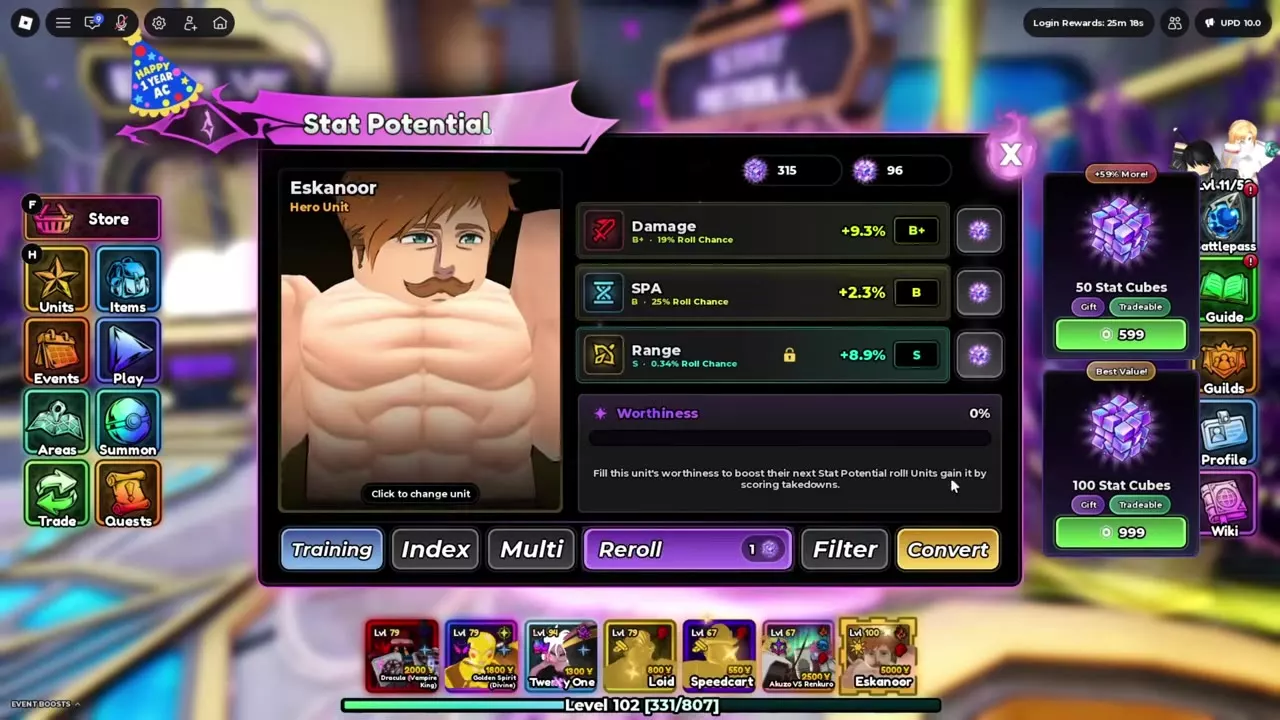
Damage, SPA and Range each have their own percentage, letter grade and roll chance. Grades run from C-, C, C+, B-, B, B+, A-, A, A+, S-, S, S+, SS to SSS. Compare the actual percentage as well as the grade.
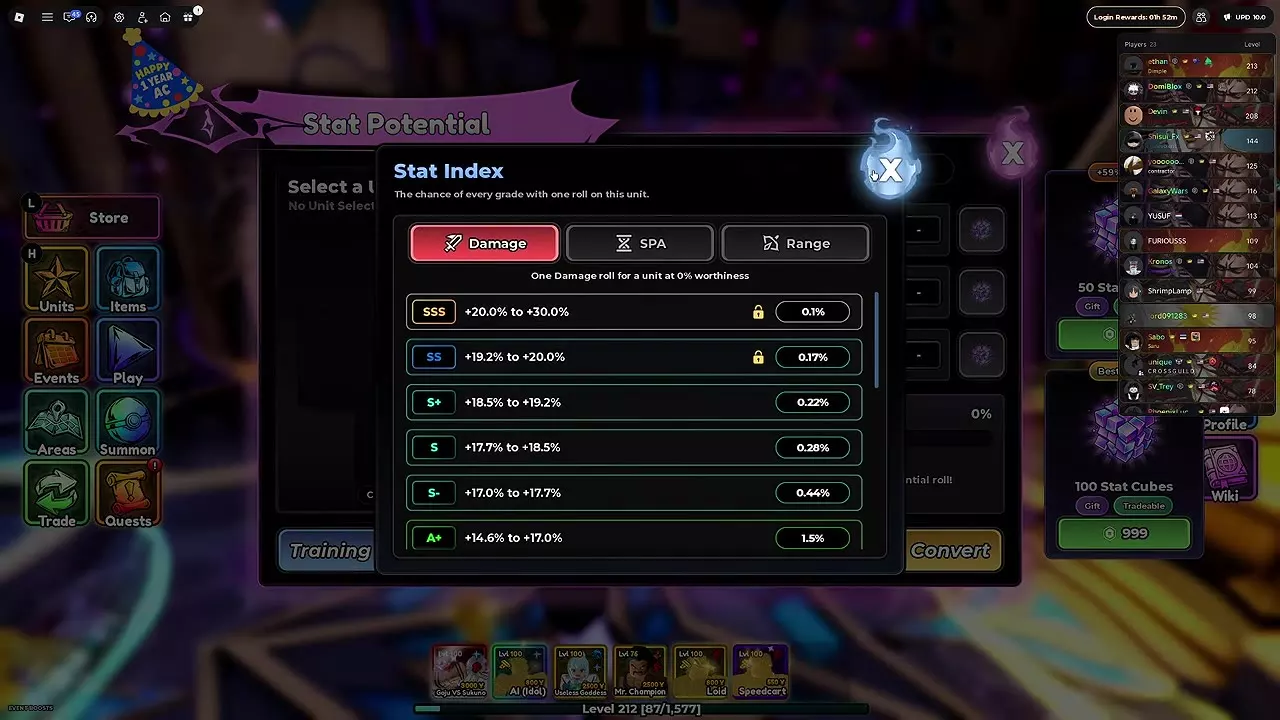
Open Stat Potential at the Stat Reroll facility and select a unit from Collection. Use the Heroes tab to select Eskanoor. Open Index, then choose Damage, SPA or Range to inspect that attribute’s ranges and probabilities. Hover a grade to read its exact roll percentage.
The grade index below uses 0% Worthiness. Each probability is for one roll of the named attribute. Equal letters do not mean equal odds: Damage S has a 0.28% chance, while Range S has a 0.34% chance under that condition. Do not apply Damage’s percentage ranges to SPA or Range.
Values within a grade are uniformly random, with an additional rule for SSS described under Choose cubes and preserve good stats.
Stat Index
- Full rerolls use
- 1 × Stat Cube (Per unit per roll.)
- Single-attribute rerolls use
- Perfect Stat Cube
| Level / Stage | Damage range minimum | Damage range maximum | Damage roll chance | Range roll chance | SPA roll chance |
|---|---|---|---|---|---|
| Grade C- | -10 % (0% Worthiness)
| -6.7 % (0% Worthiness)
| 1.5 % (0% Worthiness)
| — | — |
| Grade C | -6.7 % (0% Worthiness)
| -3.3 % (0% Worthiness)
| 3.3 % (0% Worthiness)
| — | — |
| Grade C+ | -3.3 % (0% Worthiness)
| 0 % (0% Worthiness)
| 12.5 % (0% Worthiness)
| — | — |
| Grade B- | 0 % (0% Worthiness)
| 3.3 % (0% Worthiness)
| 25.5 % (0% Worthiness)
| 25.5 % (0% Worthiness)
| — |
| Grade B | 3.3 % (0% Worthiness)
| 6.7 % (0% Worthiness)
| 25 % (0% Worthiness)
| 25 % (0% Worthiness)
| 25 % (0% Worthiness)
|
| Grade B+ | 6.7 % (0% Worthiness)
| 10 % (0% Worthiness)
| 19 % (0% Worthiness)
| — | — |
| Grade A- | 10 % (0% Worthiness)
| 12.3 % (0% Worthiness)
| 6 % (0% Worthiness)
| — | 6 % (0% Worthiness)
|
| Grade A+ | 14.6 % (0% Worthiness)
| 17 % (0% Worthiness)
| 1.5 % (0% Worthiness)
| — | — |
| Grade S- | 17 % (0% Worthiness)
| 17.7 % (0% Worthiness)
| 0.44 % (0% Worthiness)
| — | — |
| Grade S | 17.7 % (0% Worthiness)
| 18.5 % (0% Worthiness)
| 0.28 % (0% Worthiness)
| 0.34 % (0% Worthiness)
| — |
| Grade S+ | 18.5 % (0% Worthiness)
| 19.2 % (0% Worthiness)
| 0.22 % (0% Worthiness)
| — | — |
| Grade SS | 19.2 % (0% Worthiness)
| 20 % (0% Worthiness)
| 0.17 % (0% Worthiness)
| 0.19 % (0% Worthiness)
| 0.19 % (0% Worthiness)
|
| Grade SSS | 20 % (0% Worthiness)
| 30 % (0% Worthiness) This is the upper end of the listed range. SSS rolls can exceed it up to the attribute's cap, with most results toward the lower end.
| 0.1 % (0% Worthiness)
| — | — |
Worthiness and Training
Worthiness belongs to the unit you intend to reroll. Earn takedowns with that unit or assign it to Training. Filling Worthiness improves the next Stat Potential roll, so build it before spending cubes on a target result.
Both Stat Cubes and Perfect Stat Cubes use 100 percentage points of Worthiness after a roll. Worthiness can exceed 100%: a full reroll at 136% leaves 36%. You can also reroll at 0%; reaching 100% is not an entry requirement.
Train a unit
- Open Stat Potential → Training.
- Assign up to 3 units.
- Leave them training online or offline. You can keep using them in play and remove them from Training at any time.
Each assigned unit gains 100 percentage points of Worthiness and 25 levels per hour, stopping at 400% Worthiness and Level 100, respectively.
Full, single-stat and group rerolls
Set the grades to keep
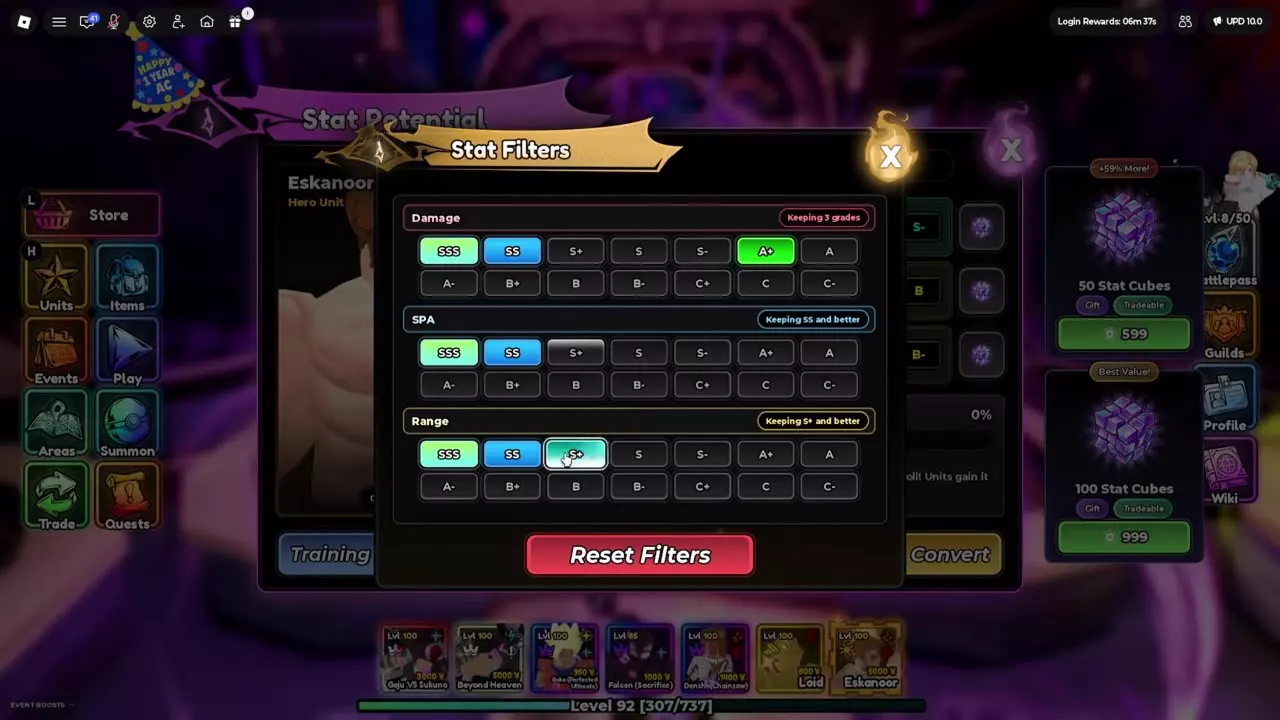
Open Filter and select the grades you want to keep separately for Damage, SPA and Range. Toggle individual grades; selections do not have to be consecutive. For example, you can keep SSS, SS and A+ for Damage while choosing SS and above for SPA and S+ and above for Range. Reset Filters clears the configuration.
Reroll the intended attributes
- Select the unit and inspect its current three potentials and Worthiness.
- Use the main Reroll button to replace all three potentials for 1 Stat Cube. To change one attribute, use the Perfect Stat Cube button beside that attribute instead.
- Click a single-attribute button for one roll, or hold it to auto-roll.
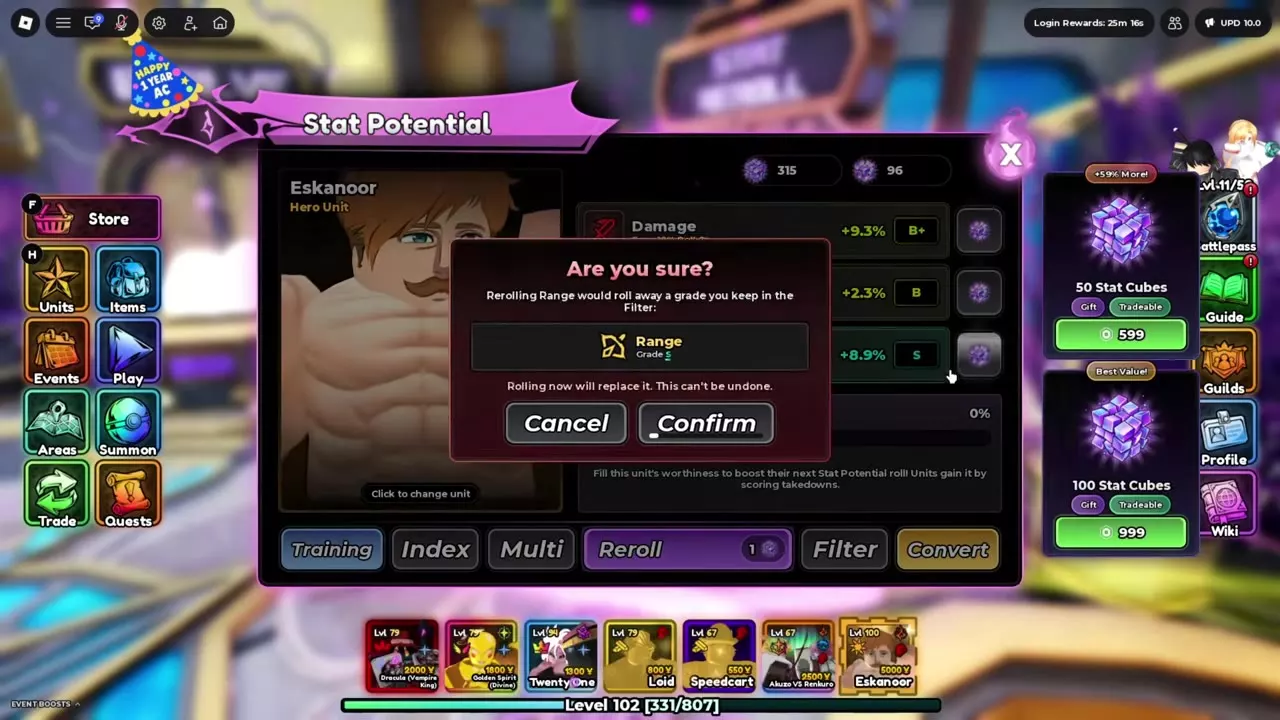
- If an overwrite warning lists a result you want to keep, choose Cancel. Choose Confirm to replace it permanently.
Filter provides an overwrite warning when a reroll includes a kept grade. Both full and single-attribute rerolls can trigger it. A lock-shaped icon does not prevent a replacement you confirm. For example, confirming a full reroll can replace Range S along with Damage and SPA; rerolling Damage alone leaves Range unchanged.
Reroll a group
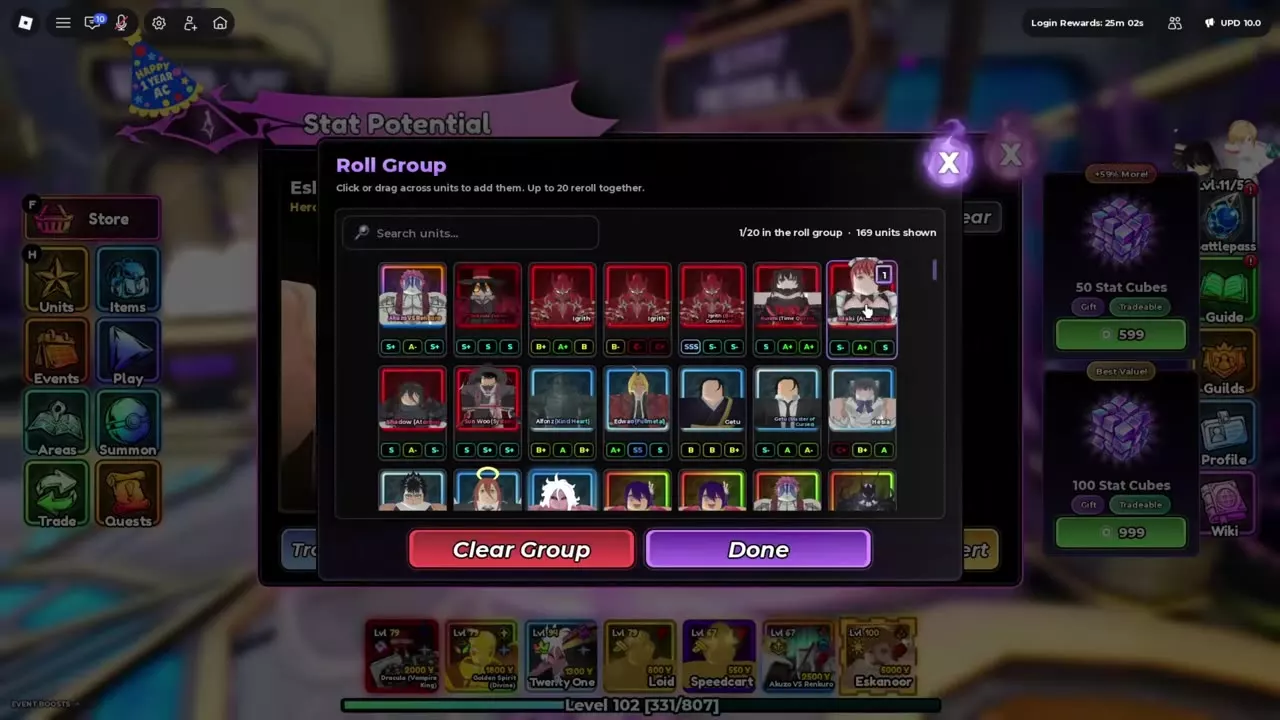
- Configure your keep grades in Filter, then open Multi to view Roll Group.
- Use Clear if you want to empty the existing group.
- Choose Add Units. Search Collection, then click or drag across units to select up to 20. Clear Group resets the selection; Done returns to Roll Group.
- Read the displayed group cost. Each unit being rerolled costs 1 Stat Cube per roll; a six-unit group costs 6 Stat Cubes for a group roll.
- Hold Reroll for continuous rolling. Each unit stops when it reaches its configured keep grades.
Convert and transfer potentials
Convert a set into a Stat Token
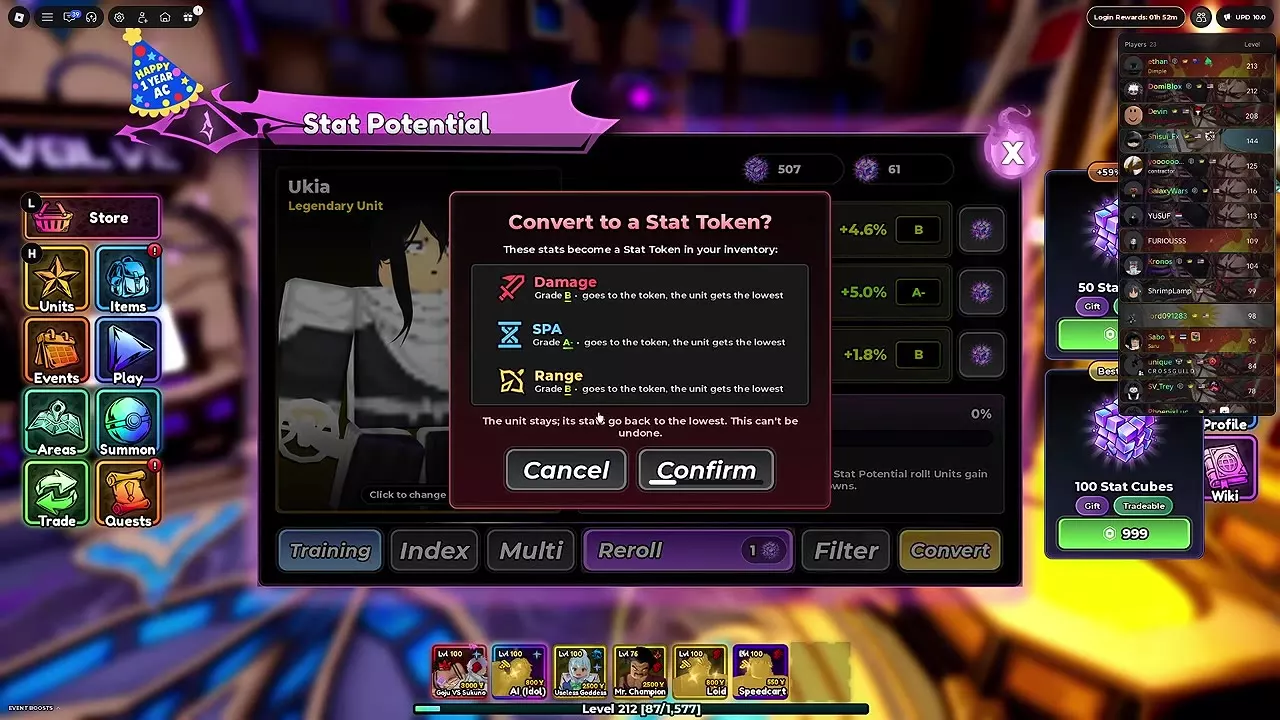
Convert moves the selected unit’s current Damage, SPA and Range potentials into a Stat Token. You keep the source unit, but all three of its potentials reset to their minimum values. Conversion cannot be undone.
- Open Stat Potential at Stat Reroll and select the source unit from Collection.
- Choose Convert and read the confirmation listing its three potentials.
- Confirm to create the token and reset the source unit’s potentials.
- After the conversion success message, open Items → Tokens to inspect the Stat Token’s stored values.
Apply the stored potentials
Talk to Wish Girl in the lobby and open Transfer Potential. Use the Stat Transfer window to apply the Stat Token’s stored Damage, SPA and Range potentials to the intended recipient. A Stat Token can give its stored potentials to any unit, and applying it consumes the token. Stat Transfer keeps the unit.
Choose cubes and preserve good stats
| Current potentials | Recommended method | Resource |
|---|---|---|
| All three need replacing | Full reroll | Stat Cube |
| Two meet your target | Single-stat reroll | Perfect Stat Cube |
| Several units need rerolls | Multi | Stat Cubes |
Use full rerolls while all three attributes need improvement. Once two meet your target, switch to the remaining attribute’s Perfect Stat Cube button: spending more full rerolls puts those two good results at risk.
Choose keep grades separately for each attribute because their ranges and probabilities differ. Use the actual percentages to judge two results within the same grade.
SSS can exceed its listed upper range. The Damage index lists +20% to +30%, but SSS results can extend beyond the displayed maximum up to the attribute’s cap, with most results toward the lower end. Treat +30% as the listed endpoint rather than an absolute Damage cap.
Use the resource farming routes to find sources for the cube type you need.
Training and resource routes
- Unit leveling and Collection management covers feeding XP Food, fusing spare units, equipment, locks and storage alongside Training.
- Items and materials provides the consumable directory for Stat Cubes, Perfect Stat Cubes and Stat Tokens.