
Anime Crusaders X Trait Rerolls, Slots and Pity
Keep a useful trait while pursuing a stronger alternative. Trait Reroll lets you switch currencies, store a result in Slot 2 and protect target results during continuous rerolls.
Open Areas → Enhancements → Trait Reroll and select your unit. Move the result you want to keep into Slot 2, set your target's Lock in Filter, then reroll the other ACTIVE slot. Check the selected unit's cost before spending: Eskanoor costs 50 Trait Remnants or 25 Trait Tokens per roll. Pity belongs to each unit and has separate counters for individual traits.
Select a unit and reroll currency
- Open Areas, travel to Enhancements and walk into the Trait Reroll stand.
- Click the unit preview to open Collection.
- Choose your unit under Units, or switch to Heroes for Eskanoor, then press Select.
- Select Trait Remnant or Trait Token at the bottom of the window.
- Read the required amount on Reroll after selecting both the unit and currency.
You must own the selected unit and have enough of the selected resource. Each completed reroll replaces the previous result in the ACTIVE slot.
Costs by unit
| Unit | Currency | Cost per roll |
|---|---|---|
| Ayzen, Goju, Berserk, Shadow | Trait Remnant | 2 Remnants |
| Twenty One | Trait Remnant | 2 Remnants |
| Kayt | Trait Token | 1 Token |
| Eskanoor | Trait Remnant | 50 Remnants |
| Eskanoor | Trait Token | 25 Tokens |
The cost belongs to the selected unit and currency; these prices do not establish a currency exchange rate. Eskanoor also uses a separate hero-trait pool and does not roll regular traits such as Crusader.
Budget your rolls
Divide your resource balance by the cost per roll and round down. For Twenty One, 131 Trait Remnants ÷ 2 = 65 rerolls, with 1 Remnant left.
The Trait Reroll shop offers 50 Trait Tokens for 1,799 Robux and 100 Trait Tokens for 2,999 Robux. Both packs support gifting and are marked Tradeable.
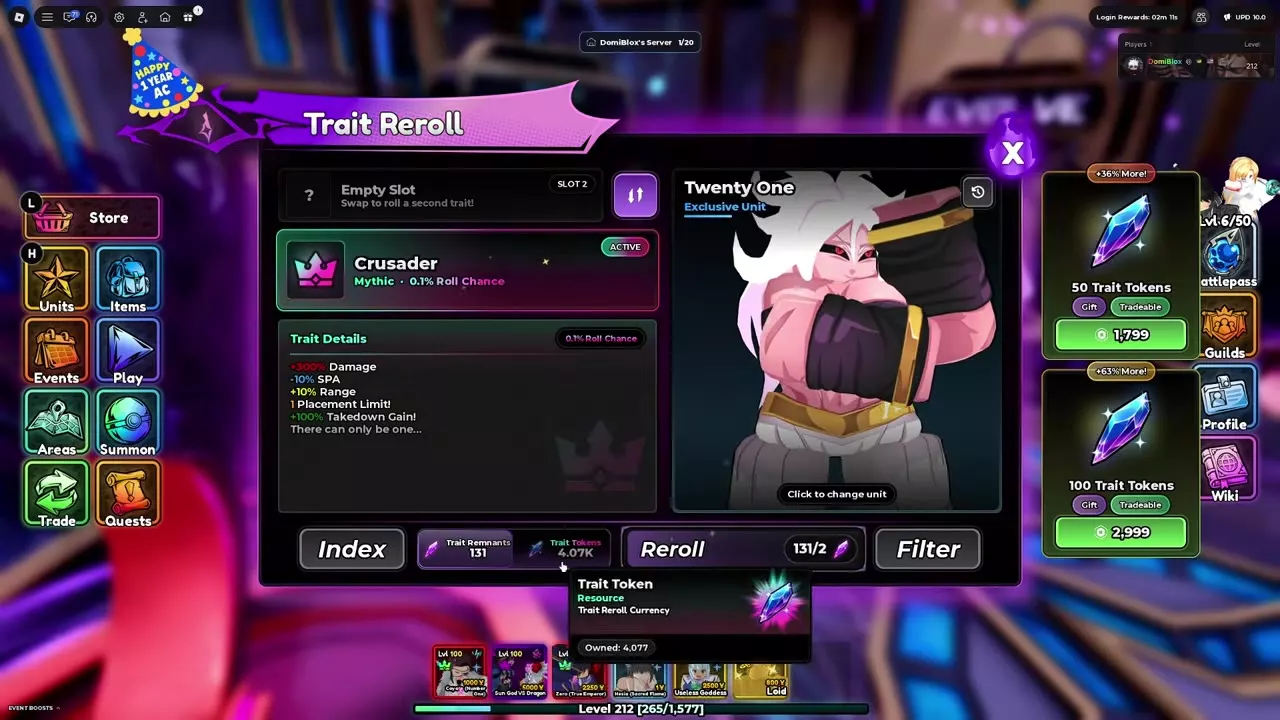
ACTIVE, Slot 2 and Double Traits
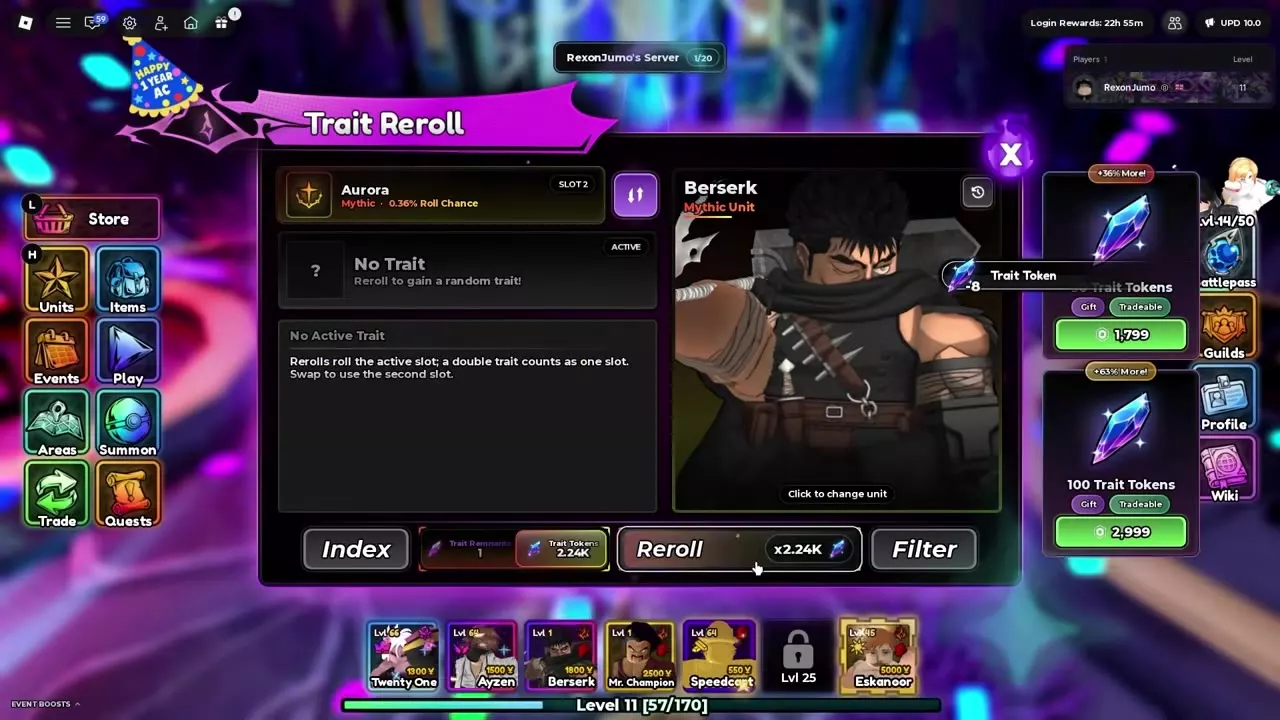
ACTIVE marks the result currently in use. Slot 2 stores an alternative; the two slots do not activate together.
Save a result and reroll the other slot
- Obtain a trait you want to keep.
- Press the swap button between the two slots to move that result into Slot 2.
- Check that your saved result is labeled SLOT 2.
- Reroll the other ACTIVE slot. The saved result stays in Slot 2.
- Press the swap button again when you want the saved result to become ACTIVE.
For Berserk, save Omniscient before continuing toward Crusader. Omniscient's +100% DoT Duration preserves a useful damage-over-time alternative while you spend resources on the other slot. Aurora can be stored the same way.
Double Traits use one slot
A Double Trait contains two component traits in a single result. It occurs on 0.2% of regular-unit rolls and still occupies just one slot.
- Tactician + Fierce I combines +50% Unit XP Gain with Fierce I's damage bonus. Tactician's XP effect does not stack.
- Focus III + Focus II contains the +20% Range and +17.5% Range tiers together in one slot.
A Double Trait is different from keeping one result ACTIVE and another in Slot 2. It also has its own protection option in Filter.
Set Lock and continuous rerolls
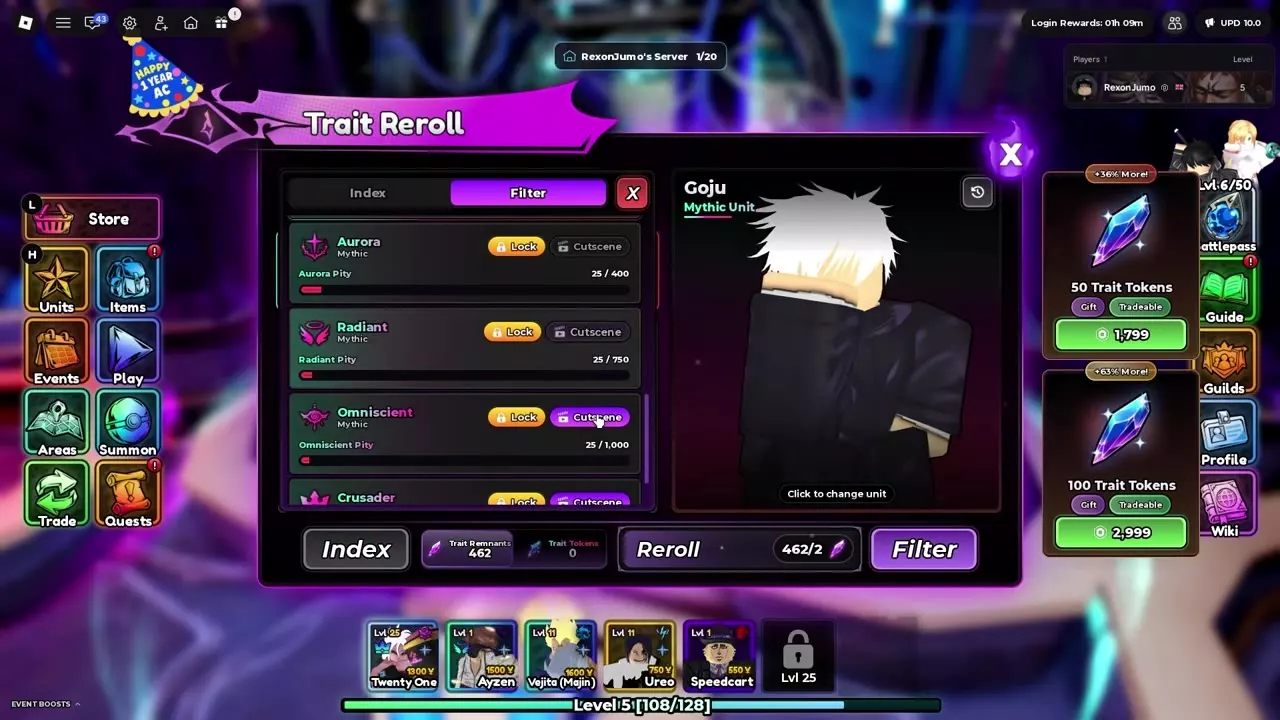
Open Filter after selecting your unit. Lock determines which results stop continuous rerolls and require confirmation before replacement. For regular traits, Cutscene separately controls the corresponding large reveal animation.
- Turn on Lock for each result you want to stop on.
- Set the available Cutscene toggles for the regular-trait animations you want to see.
- Return to the reroll controls. Click Reroll once for one roll, or hold it for continuous rerolls.
- Stop holding to end the operation, or let a protected result stop the sequence.
- Save a result you want to retain before continuing.
Every enabled Lock matters. A protected Hawkeye or Double Trait stops the sequence even when you are pursuing Crusader. Turn off Double Trait's Lock if you want to roll through those results.
Replacing a protected result
Trying to reroll a protected ACTIVE result opens a replacement dialog. Choose Cancel to keep it or Confirm to replace it. Confirmed replacement cannot be undone. Lock adds a stop and confirmation; it does not permanently prevent replacement.
Keep Shining while pursuing The One
For Eskanoor, move Shining into Slot 2, keep The One locked and reroll the other ACTIVE slot. Turn off Shining's Lock if you want continuous rerolls to pass through additional Shining results. The Shining already stored in Slot 2 remains intact while you reroll the other slot.
Eskanoor's Filter has Lock settings for Seven Sins, Sunspot, Shining and The One. Hero-trait results play a reveal animation; the regular pool's individual Cutscene toggles are separate from these hero settings.
Read pity and Trait History
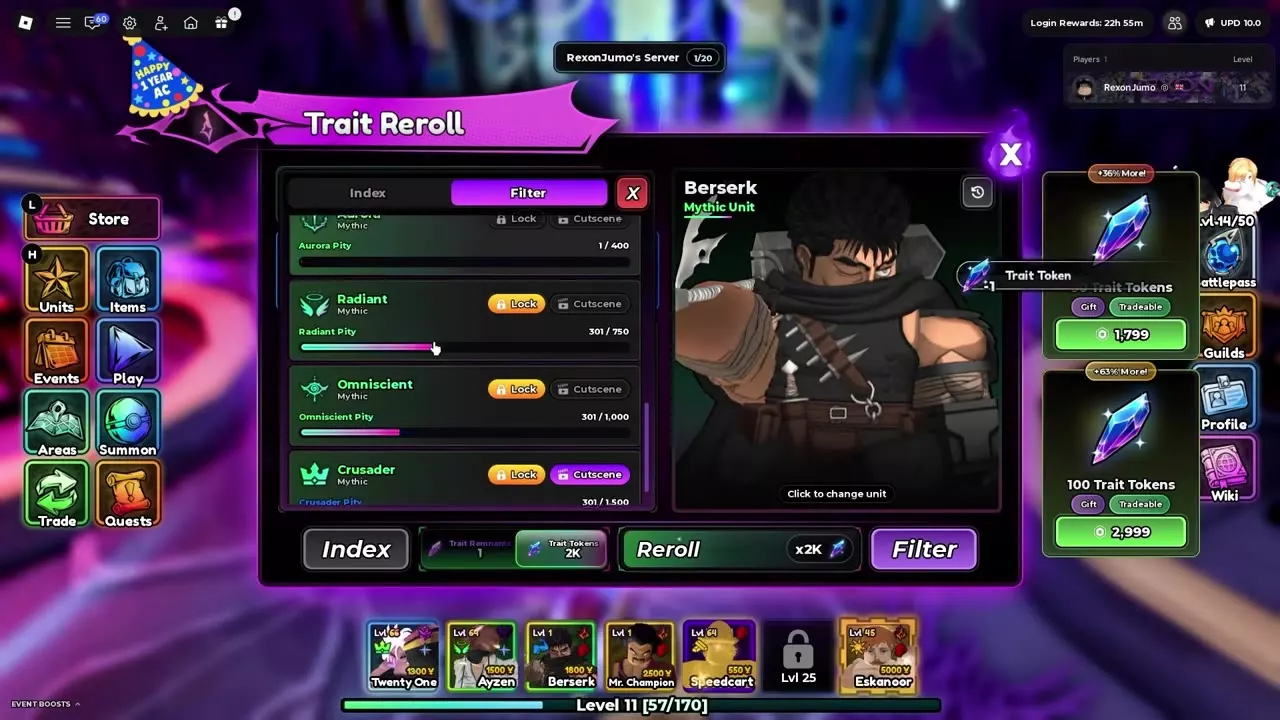
Select the unit whose progress you want to inspect, then open Index or Filter to read its trait-specific pity counters. Pity is tracked separately for each unit, and individual traits have their own counters. Switching units changes whose progress and roll count you are viewing.
Obtaining one trait resets its corresponding counter without resetting all the others. For example, on Goju, obtaining Eclipse reset Eclipse's counter to 0 while the other four Mythic counters continued from 25 to 34. Different counters on the same unit therefore represent different progress.
Calculate remaining rolls
For one unit and one trait, subtract the current progress from that counter's displayed threshold:
Additional rolls to the threshold = max(0, threshold − current progress)
At Crusader 301/1,500, the remaining progress is 1,500 − 301 = 1,199 rolls, before a counter reset. That figure measures rolls, not Trait Remnants or Trait Tokens. To budget resources, multiply the remaining rolls by the selected unit's cost in your chosen currency.
Review previous results
Open Trait History to see the traits previously rolled on the selected unit. Use the history to review past results and the ACTIVE and Slot 2 labels to identify the results currently retained.
Trait effects and reroll resources
- Compare effects, roll chances and pity thresholds in the Traits and Hero Traits directory before choosing your Filter targets.
- Use the resource farming routes to find Trait Remnant sources and choose a route for the currency you hold.
- Look up Trait Remnants, Trait Tokens and their acquisition details in Items and Materials.