
Anime Crusaders X Macro Presets
Find a community Macro preset for your map and team, then load its unit and placement settings from the Catalog or with an import code.
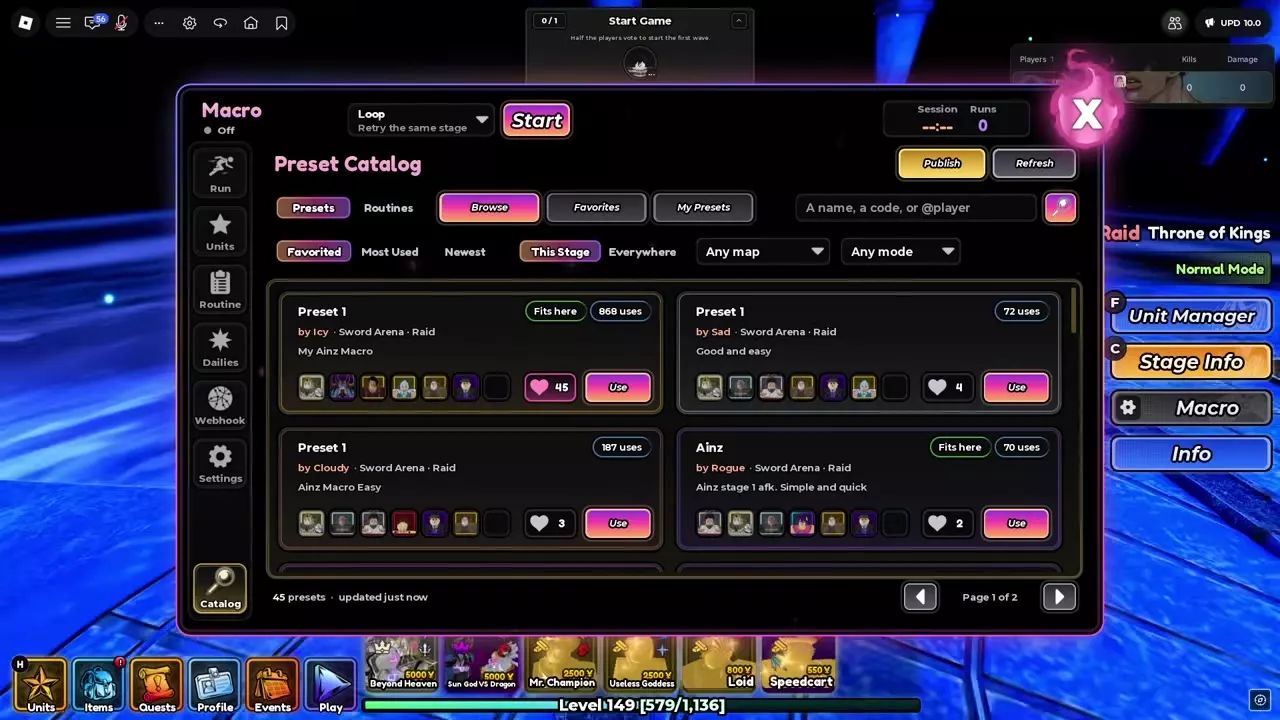
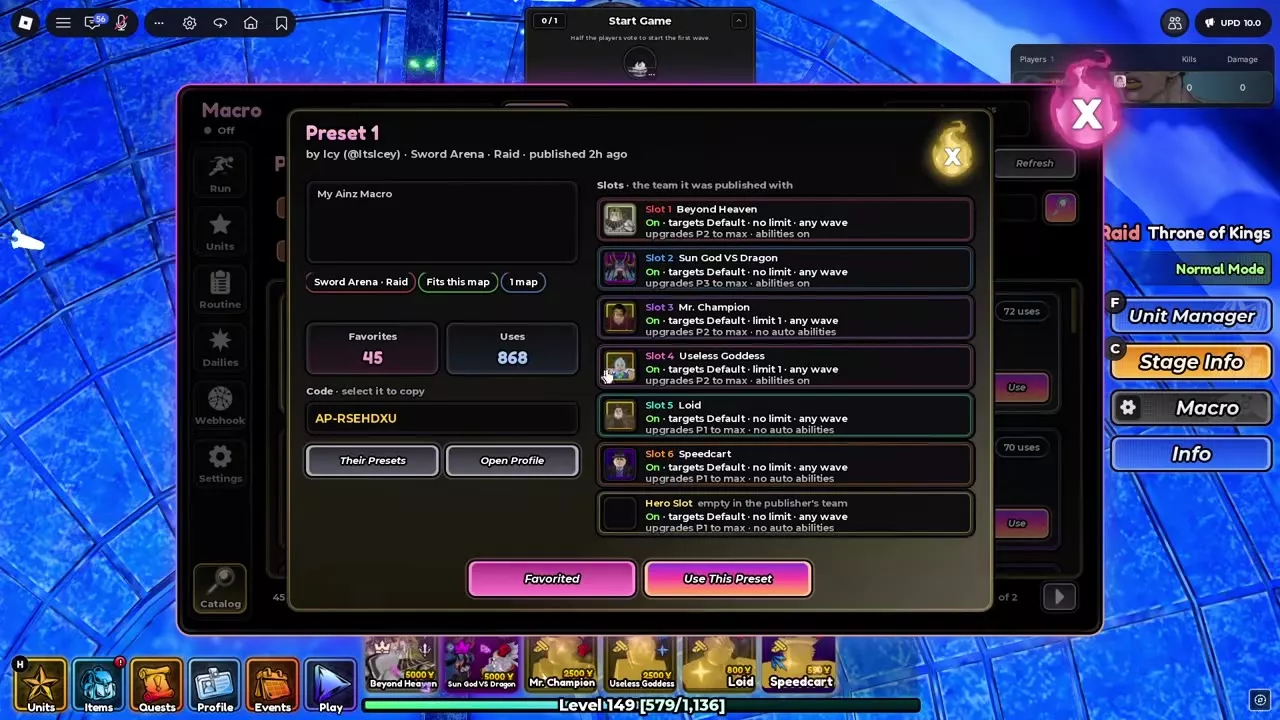
Open Macro’s Catalog to find a preset and select Use, or open Units > Import and paste its code. Icy’s Ainz preset uses AP-RSEHDXU and requires its six unit bindings to match your team.
Match presets to your map and team
Choose a preset by creator, map and mode, then compare its unit slots with the units you own. A matching map label helps you find a suitable configuration, while the slot settings show which team it uses.
Icy’s Preset 1 is published under Sword Arena - Raid with the description “My Ainz Macro.” The same imported lineup was also used in a Throne of Kings Normal Mode run.
Community preset directory
Compare creators and published map and mode labels. Open a preset’s name for its available configuration details.
Community Macro presets by creator, map and mode.
4 objects
|
|
Icy | Sword Arena | Raid |
|---|---|---|---|
|
An Ainz farming Macro preset published for Sword Arena - Raid. It configures six unit slots and has an empty Hero slot.
TipsImport AP-RSEHDXU, then match its six unit bindings to your collection. Loid and Speedcart use P1, Beyond Heaven and both damage supports use P2, and Sun God VS Dragon uses P3. The preset's Hero slot is empty. |
|||
|
|
Sad | Sword Arena | Raid |
|
A community Macro preset published for Sword Arena - Raid.
|
|||
|
|
Cloudy | Sword Arena | Raid |
|
An Ainz farming Macro preset published for Sword Arena - Raid.
|
|||
|
|
Rogue | Sword Arena | Raid |
|
A community Macro preset for Ainz stage 1, published for Sword Arena - Raid.
|
|||
Browse, use and import a preset
- Open Macro > Catalog and select Presets. Choose Browse, Favorites or My Presets.
- Search by preset name, code or
@player. Narrow the list with This Stage or Everywhere and the map and mode filters. Sort with controls such as Favorited, Most Used or Newest. - Look for Fits here or Fits this map, then open a preset to inspect its creator, description and unit slots. Check that its bindings fit your team.
- Select Use or Use This Preset. Alternatively, copy its code, open Units > Import, and paste it. Icy’s Preset 1 code is AP-RSEHDXU.
- Check the imported unit bindings and placement settings, select your run mode and press Start. Units identifies the loaded configuration as Imported Preset.
Use the favorite control to save a Catalog entry. Their Presets opens more presets from that creator, while Open Profile opens their profile. For your own configuration, Units includes Fill My Team, Rename, Share and Publish; Catalog also has Publish and Refresh.
Icy's economy and support setup
Icy’s setup gives Loid and Speedcart priority P1 to build the early economy. Mr. Champion and Useless Goddess provide physical and magic support, respectively; each is limited to one placement and upgraded at P2.
Beyond Heaven and Sun God VS Dragon fill the combat slots, with Beyond Heaven at P2 and Sun God VS Dragon at P3. Automatic abilities are enabled for both combat units and Useless Goddess. The Hero slot is empty. Open Icy’s Preset 1 for the complete slot configuration.
Macro configuration and the target stage
For slot setup, placement and running options, see the built-in Macro guide. For the trial’s stages and rewards, see The Undying Gate and Einz rewards. One Throne of Kings Normal Mode run with Icy’s imported lineup finished in 5 minutes 9 seconds.
Articles and guides
2Anime Crusaders X Macro Presets
Find Anime Crusaders X Macro presets by creator, map and mode, then use the Catalog or import Icy's Ainz preset by code.
Anime Crusaders X Macro Discord Webhook Setup
Connect your Anime Crusaders X Macro to Discord, test the webhook, and choose notification events, mentions, and rare-drop thresholds.